


Activation
Attention! To get all Professional features you should get the software in your personal section. In other cases you may just enter your license key upon the software request. Please adhere to license terms to avoid license blocking and revoking. You may get an updated key as well as information about blocking in your personal section (restore login).
You should activate the licensed copy when first run on a new/modified hardware or after entering a license key.
Online Activation
Just push the button Online Activation (Internet access is necessary, not available in DOS). Upon a successful connection to a server the activation code will be saved to dmde.ini.
Manual Activation
If Online activation is not available you may manually get and enter activation code.
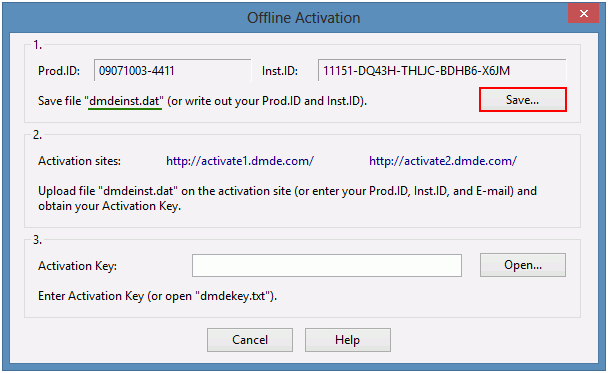
1. Run the software on a computer where it will be used. Select Manual Activation
and save the file dmdeinst.dat (or write out your Prod.ID and Inst.ID).
2. Open the activation site
http://ac.dmde.com/ or
http://ac.softdm.com/
on any computer. Upload the file dmdeinst.dat
(or enter your Prod.ID and Inst.ID).
An activation code will be generated for you.
3. Enter your activation code to complete the activation.


Activation Types (Professional Edition)
1. Stationary Activation
Stationary Activation associates the software use with a specific computer: select Stationary activation (click or hit [Space bar]) and use Online or Manual Activation.
2. Portable Activation (Portable Use)
Portable Activation associates the software use with a removable USB flash drive that allows using on different computers without Internet access. Available in Windows (2K and higher), Linux, and macOS.
Initial Association with a Device
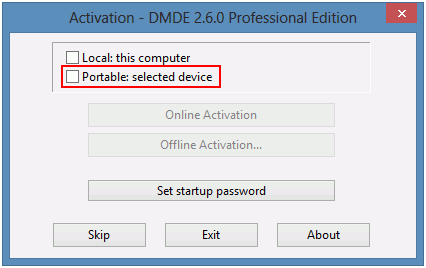
1. Select Portable activation
and specify the removable device for association.
The device must always report the same correct serial number
(12 or more digits and capital Latin letters,
e.g. vendors Kingston, SanDisk are known as best conforming the standard).
2. Use Online or Manual Activation to complete the association
(will be stored to dmde.ini).

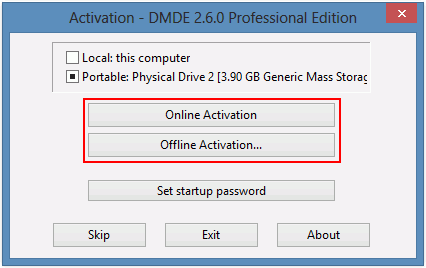
Attach the device to a computer, run the software, and select the device if necessary.
3. One-time Activation
It is designed to one-time run the software on a client computer when it is not possible to use portable activation (e.g. for a remote use).
Download the basic software version (without Professional features) and enter special license key (Client Edition) and one-time password which are issued in the personal section (restore login) and then activate Online or Manually.